Best Practices for Aether Embeds:
- Identify a clear space on your website that will allow the Aether to have prominent visibility and make it easy to interact with.
- Target a position on the page "above the fold"so visitors can see your Aether without having to scroll to see it.
- Keep the background neutral, use a single color or simple background so as not to distract or overwhelm visitors.
- Avoid using multiple content types that will make it more difficult for the page/content to load.
- Size the Aether embed to cover 1/2 to 2/3rds of the page, not too small, not too large or else visitors won't be able to navigate the rest of the page.
- Consider using a 16x9 or 4x3 aspect ratio for best fit and to ensure all the viewer controls are visible and easy to use.
To embed your Aether:
- Login to your Threshold Dashboard.
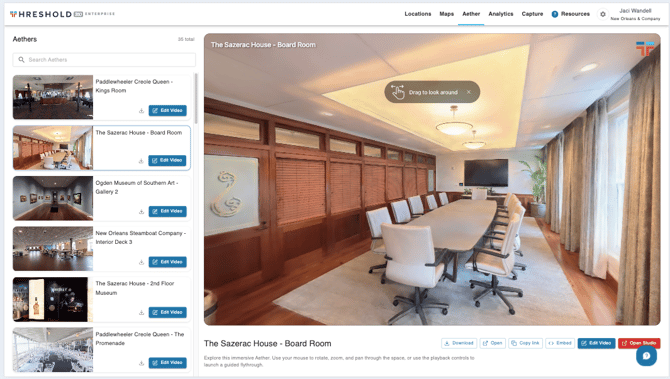
- Navigate to the Aether tab at the top of the page.
- Click the specific Aether space you're embedding on the left hand side.
- Below the Aether viewer, you'll see several buttons with options to Download, Open, Copy Link, and Embed. Select Embed.
- In the pop-up window, you'll see a pre-generated iframe code. Select Copy Code.
- Paste this code into your website or CMS tool to embed it onto a particular page on your website. Make adjustments to the Width, Height, and Max-height parameters as needed to fit the page.